8 min read
The Best Free Calorie Counter Apps (2026)
The best free calorie counter apps compared: MyFitnessPal, Lose It, Cronometer, Cal AI and TrackMyCalorie, by price, database and logging.
The TrackMyCalorie team
The best free calorie counter app is the one you will still be using in three months, and for most people that comes down to how fast it is to log a meal and how well it knows the foods you actually eat. There is no single winner for everyone, but there are clear best-fits: MyFitnessPal for the biggest database, Cronometer for nutrition detail, Lose It for simplicity, and newer AI-first apps, including our own TrackMyCalorie, for logging by photo in seconds. Let me compare them honestly, including where each one costs money.
What "free" actually means
Before the apps, a word on the word. "Free" is used three different ways in this corner of the app store, and the difference matters.
A free tier means the core app is free forever, with some features locked behind a paid upgrade. A free trial means the whole app is free for a week or two, then it charges you. And genuinely free means the features you need cost nothing, with no countdown. Most of the big names run a free tier with a paid "Premium"; some newer AI apps lean on a free trial that converts to a subscription. When you read "free calorie counter app," always check which of the three you are getting, because a trial that bills you in seven days is not the same as a tool that is free to keep.
How we compared them
We judged each app on the things that actually decide whether you keep logging:
- Price. Is it genuinely free, free-with-limits, or free-trial-then-paid?
- Food database. How big and accurate, and does it cover restaurant and local foods?
- Logging speed. Barcode, photo, voice or text, and how little friction there is.
- AI features. Photo recognition and natural-language logging.
- Offline use. Can you log without signal?
- Extras. Health-app sync, progress tracking, habits.
Here is the short version, with the detail below.
| App | Free to keep? | Standout strength | Watch-out |
|---|---|---|---|
| MyFitnessPal | Free tier + paid Premium | Huge food database | Some logging features are paid |
| Lose It | Free tier + paid Premium | Simple and approachable | Smaller database |
| Cronometer | Free tier + paid Gold | Detailed micronutrients | More detail than casual users need |
| Cal AI and similar | Often free trial, then paid | Fast AI photo logging | Can convert to a subscription |
| TrackMyCalorie | Free | AI photo and text logging, local foods | New, focused feature set |
MyFitnessPal
MyFitnessPal is the household name, and its biggest asset is its enormous food database, built up over many years with countless branded and restaurant entries. If you eat packaged or chain foods, odds are it is already in there. The barcode scanner is quick, the community is huge, and it integrates with a long list of fitness apps and devices.
The trade-off is that MyFitnessPal has moved more features behind its Premium subscription over time, and some logging conveniences now sit on the paid side. The free tier is still genuinely usable for basic calorie tracking, but you may bump into upsells. The crowd-sourced database is also a double-edged sword: it is vast, but entries can be inconsistent, so the first result is not always the most accurate. For sheer coverage, though, it is hard to beat.
Lose It
Lose It built its name on being friendly. The onboarding is gentle, the daily "budget" framing is easy to grasp, and the interface does not overwhelm a first-time tracker. It has a barcode scanner, a photo-logging feature, and a free tier that covers the basics, with a Premium upgrade for extras.
It is a great pick for someone who found MyFitnessPal fiddly or intimidating. The database is smaller than MyFitnessPal's, so you may occasionally have to add a food yourself, but for mainstream Western groceries and common meals it does the job. If your priority is "just get me logging without a learning curve," Lose It is a strong, approachable choice.
Cronometer
Cronometer is the choice for people who care about more than calories. Where most apps track calories and the three macros, Cronometer tracks dozens of micronutrients, the vitamins and minerals, using carefully curated, higher-quality data rather than fully crowd-sourced entries. If you are managing a specific health condition, following a particular diet closely, or you simply want to know whether you are getting enough iron and magnesium, it is in a class of its own.
That depth is also its watch-out. For someone who just wants to lose a few pounds and log a sandwich, Cronometer can feel like more instrument than the job needs. It has a solid free tier and a paid Gold upgrade. If nutrition detail excites you, pick it; if it makes your eyes glaze over, one of the simpler apps will serve you better.
Cal AI and the new AI photo apps
A wave of newer apps, Cal AI among the best known, lead with AI photo logging: point your camera at a plate and get an instant estimate. The appeal is obvious, it is the fastest way to log a meal with no barcode, and for anyone who abandoned tracking because manual entry was tedious, it can be the thing that finally sticks.
Two honest caveats. First, many of these apps run on a free trial that becomes a paid subscription, so check the pricing before you commit. Second, photo estimates have a known blind spot: they tend to underestimate meals because cameras cannot see oil, butter and dressing, as we cover in detail in are AI calorie trackers accurate. The best AI apps address this by telling you their assumptions and letting you correct them, rather than quietly logging the lowest plausible number.
TrackMyCalorie
We will be upfront, since this is our blog. TrackMyCalorie is the newcomer here, so it does not have MyFitnessPal's years of database or Cronometer's micronutrient depth. What it does offer is a genuinely free core, fast AI logging, and a couple of things the big names handle poorly.
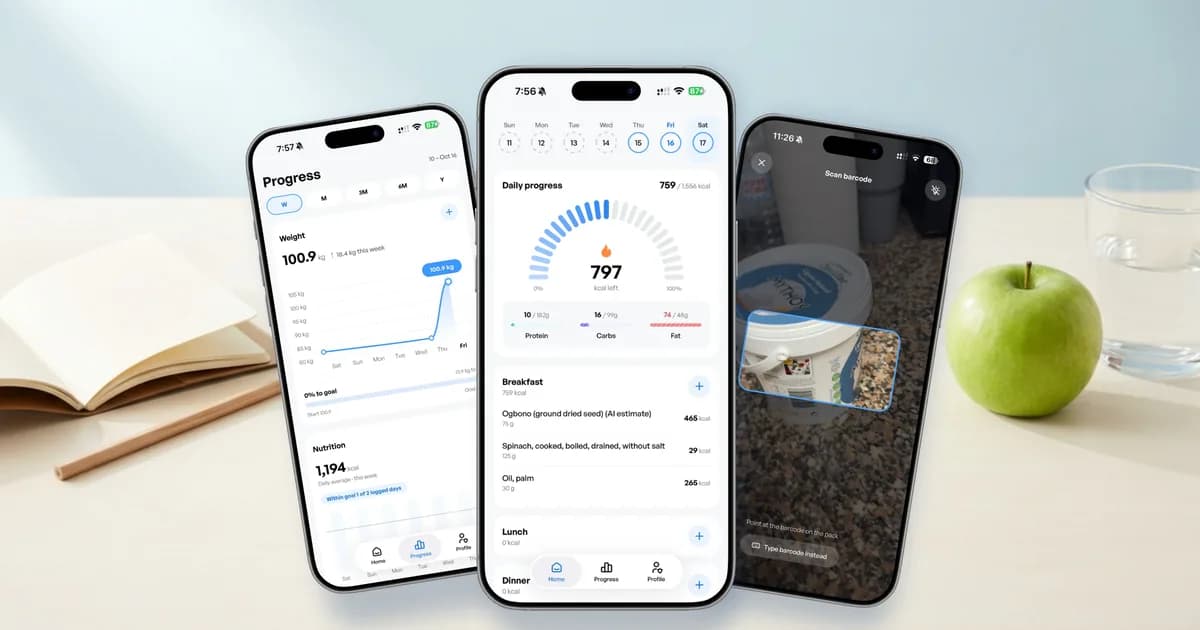
You can log by snapping a photo, scanning a barcode, or typing a plain sentence like "500g of jollof rice with low oil." The calories come from verified database entries wherever the food exists: the database is built on USDA FoodData Central for generic foods, with branded and restaurant items pulled from FatSecret on demand, so you get real numbers rather than purely crowd-sourced guesses. It only estimates when a food genuinely is not there, and because AI estimates tend to miss hidden fat, it states the oil assumption it is using and lets you change it instead of guessing low. It works fully offline and syncs when you are back online, it covers West African and other local dishes as first-class foods rather than afterthoughts, and it connects to Apple Health and Health Connect.
What it does not do yet: coaching, meal plans or a social feed. It is a focused, honest calorie tracker, not an everything-app. If that is what you want, and especially if you eat foods the big databases handle badly, it is worth a look. Start by working out your target with our calorie calculator.
How to choose the right one for you
Forget the "best overall" label and match the app to you. If you eat lots of packaged and restaurant food and want the deepest database, start with MyFitnessPal. If you are new to tracking and want it painless, try Lose It. If you care about vitamins and minerals, Cronometer is unmatched. If manual logging is what always kills your motivation, an AI photo app, ours or another, removes that friction. And if you eat local or home-cooked foods that the mainstream apps fumble, pick one that actually knows them.
Whatever you choose, the rules of success are the same: log consistently, be honest about portions and cooking oil, and watch the weekly trend rather than any single day. The perfect app you quit beats nothing; the "good enough" app you keep using wins.
People Also Ask
What is the best free calorie counter app?
There is no single best for everyone. MyFitnessPal has the biggest free database, Lose It is the simplest, Cronometer is best for nutrition detail, and AI-first apps like TrackMyCalorie are fastest for photo logging. The best one is the free app you will actually keep using.
Is MyFitnessPal still free?
MyFitnessPal has a free tier that covers basic calorie tracking, alongside a paid Premium subscription that unlocks extra features. Some logging conveniences have moved to Premium over time, so check which features you need are included in the free version.
Which calorie app is the most accurate?
Accuracy comes from the database, not the brand. Apps that use verified data, like Cronometer, or that build on USDA FoodData Central and let you scan barcodes, give the most reliable numbers. For AI photo logging, accuracy improves a lot when you tell the app about cooking oil and portion size.
The bottom line
The best free calorie counter app depends on what you need: MyFitnessPal for database size, Lose It for simplicity, Cronometer for nutrition detail, and AI-first apps like TrackMyCalorie for fast photo logging and local foods. Check whether "free" means free-to-keep or free-trial, then pick the one you will stick with, because consistency is what actually gets results.
Ready to start logging? TrackMyCalorie is free to use — set your target with our calorie calculator, then log your first meal by photo, barcode or a quick sentence.